

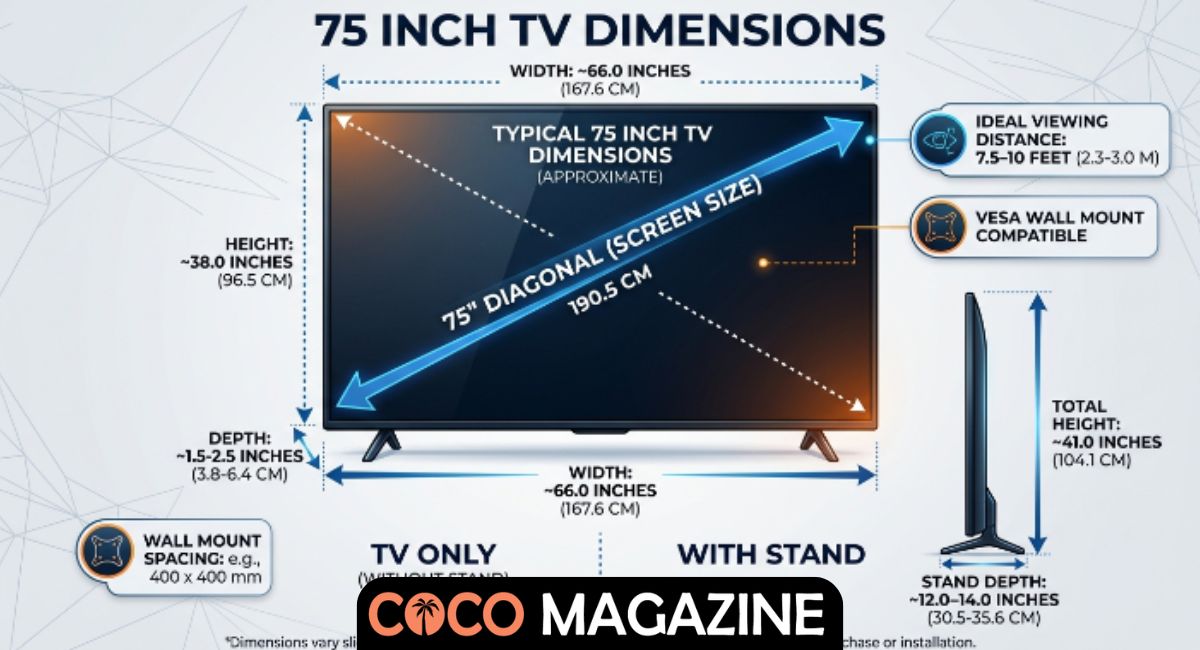
Choosing the right TV starts with understanding the 75 Inch TV Dimensions, not just the number printed on the box. Many people assume a 75-inch TV is 75 inches wide, but the measurement actually refers to the diagonal of the screen. The actual dimensions of a 75-inch TV include its width, height, depth, and frame, all of which affect how well it fits your room.
Whether you’re upgrading your living room or creating a home theater, knowing the 75 inch TV measurements, 75 inch TV width, 75 inch TV height, and viewing distance for 75 inch TV helps you make a smarter buying decision. This guide covers everything you need before purchasing your next large-screen television.
What Are the Actual 75 Inch TV Dimensions?
Many people believe a 75-inch television is exactly 75 inches wide. That isn’t true. The advertised size measures only the 75-inch diagonal measurement, which runs from one corner of the screen to the opposite corner. Modern televisions almost always use a 16:9 aspect ratio, so the screen width and screen height stay nearly the same across different brands. While the display size is standardized, the overall TV dimensions change slightly because manufacturers use different TV bezel size, frame designs, and TV housing. A modern bezel-less TV usually has thinner borders, making the television slightly smaller than an older model with thick bezels.
For most models sold in the United States, the actual dimensions of a 75-inch TV are very close to each other. The display measures about 65.4 inches wide and 36.8 inches tall, while the complete television measures around 66 to 68 inches wide and 38 to 40 inches tall without its stand. The TV depth normally falls between 2 and 4 inches, although premium OLED TV models are much slimmer than many QLED TV or Mini-LED TV models. These 75 inch television dimensions are important because they determine whether your television fits your wall, furniture, and available space. Always check the complete TV model dimensions before ordering instead of relying only on the advertised screen size.
| Measurement | Typical Size |
| Diagonal Screen | 75 inches (190.5 cm) |
| Screen Width | 65.4 inches (166.1 cm) |
| Screen Height | 36.8 inches (93.5 cm) |
| Overall Width | 66–68 inches |
| Overall Height | 38–40 inches |
| TV Thickness | 2–4 inches |
| Approximate TV Weight | 75–130 lbs |
Fact: Every television with a 16:9 aspect ratio has nearly identical TV screen dimensions, regardless of brand.
75 Inch TV Dimensions in Feet, CM, and Millimeters
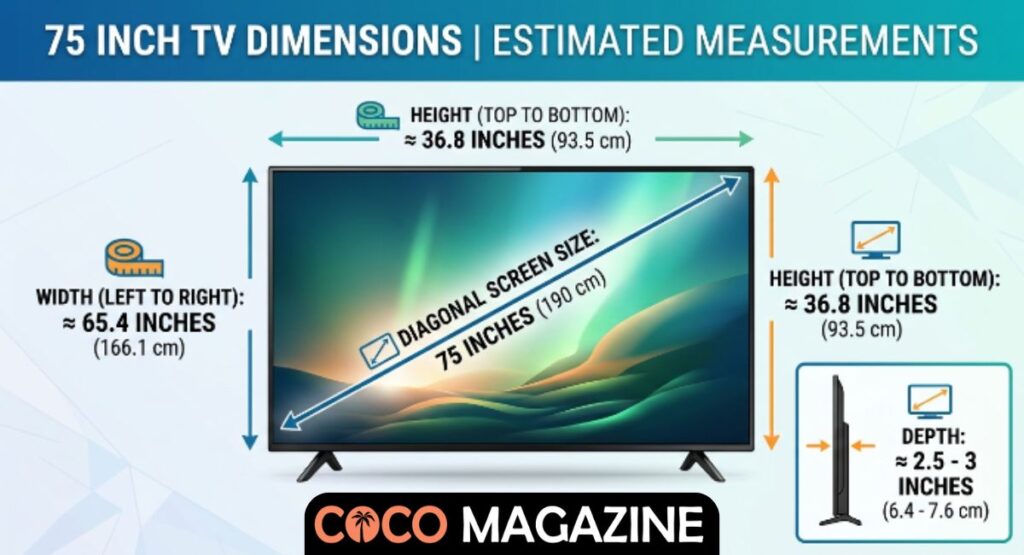
When shopping for a television, you may notice that stores, manufacturers, and furniture companies use different measurement units. One product page may list inches, another uses centimeters, while a wall mount manual may use millimeters. Understanding 75 inch TV dimensions in inches, 75 inch TV dimensions in cm, and 75 inch TV dimensions in feet makes planning much easier. It also helps when comparing products from American and international brands. Instead of guessing, you can confidently measure your room, choose the right entertainment center size, and confirm the wall mount dimensions before installation.
The table below provides an easy dimension conversion for a standard 75-inch television. These numbers represent the visible display, while the complete television may be slightly larger because of the bezel thickness and TV housing. Keep these measurements handy whenever you’re measuring wall space, shopping for furniture, or checking TV stand compatibility. They also work well with a TV size calculator if you want to compare different television sizes before making your final decision.
| Measurement | Inches | Feet | Centimeters | Millimeters |
| Diagonal | 75 | 6.25 | 190.5 | 1905 |
| Width | 65.4 | 5.45 | 166.1 | 1661 |
| Height | 36.8 | 3.07 | 93.5 | 935 |
| Typical Overall Width | 66–68 | 5.5–5.7 | 168–173 | 1680–1730 |
| Typical Overall Height | 38–40 | 3.2–3.3 | 97–102 | 970–1020 |
Quick Tip: Always compare the physical TV dimensions instead of only the screen size when choosing furniture or planning a large TV setup.
How Are 75 Inch TV Dimensions Measured?
Television measurements follow a simple standard that has been used for decades. Manufacturers measure the display from the bottom-left corner of the screen to the top-right corner. This is called the diagonal screen size, and it determines the advertised television size. It does not include the frame, stand, or speakers. Because nearly every modern television uses a 16:9 aspect ratio, the relationship between the screen width and screen height remains consistent. That is why two different brands can both advertise a 75-inch TV even though their TV width with bezel, overall width, and overall height are slightly different.
The difference comes from the outer design rather than the screen itself. Premium models such as a Samsung 75-inch TV, LG 75-inch TV, Sony 75-inch TV, TCL 75-inch TV, or Hisense 75-inch TV often use very thin frames that reduce the overall size of the television. Some models include a center stand, while others use a wide-leg stand or pedestal stand, which changes the TV footprint, TV cabinet size, and required TV console width. Before buying, compare the manufacturer’s TV specifications carefully. It only takes a few extra minutes, yet it can prevent your new television from being too large for your furniture or your room.
TV Size Measurement Guide
| What Is Measured? | Includes Stand? | Why It Matters |
| Screen Diagonal | No | Advertised TV size |
| Screen Width | No | Determines viewing area |
| Screen Height | No | Helps calculate display space |
| Overall Width | No | Fits walls and cabinets |
| Overall Height | Usually No | Determines wall placement |
| TV Depth without stand | No | Important for wall-mounted TV setups |
| TV Depth with stand | Yes | Important for furniture placement |
Remember: The advertised size never tells the whole story. Always review the complete TV fit guide and manufacturer specifications before buying. Knowing the exact television dimensions helps you plan TV space planning, improve your living room layout, maintain proper wall clearance, allow enough airflow behind TV, and create a cleaner home theater setup with safer TV installation and better TV placement tips.
How Much Space Do You Need for a 75 Inch TV?
Choosing a large television isn’t only about picture quality. You also need enough room for it to fit comfortably. A 75 inch TV size may look perfect in a showroom, yet it can overwhelm a small room if you don’t plan ahead. Start by taking accurate room measurements before placing your order. Measure the wall where the TV will hang or the area where it will sit. Compare those numbers with the 75 Inch TV Dimensions listed by the manufacturer instead of estimating. Leave extra space around the television because the overall TV dimensions include the frame, not just the display. A little breathing room creates a cleaner look and makes the room feel less crowded.
Space around the television matters just as much as the TV itself. Leave enough wall clearance for proper cable management and healthy airflow behind TV because modern televisions produce heat during long viewing sessions. Think about the position of windows, shelves, and doors as well. Direct sunlight can create glare, while nearby furniture may block your view. A well-planned living room layout improves comfort and protects your investment. If you’re building a complete home entertainment area, make sure your entertainment unit matches the size of the television instead of making it look oversized or too small.
| Space Requirement | Recommended Measurement |
| Minimum Wall Width | 72–80 inches |
| Minimum Wall Height | 45 inches |
| Side Clearance | 2–4 inches each side |
| Top Clearance | 4–6 inches |
| Rear Clearance | 2–4 inches for ventilation |
| Doorway Width for Delivery | At least 30–36 inches |
Quick Fact: Many delivery problems happen because buyers forget to measure stairways, elevators, and doorways before purchasing a large television.
Best TV Stand Size for a 75 Inch TV
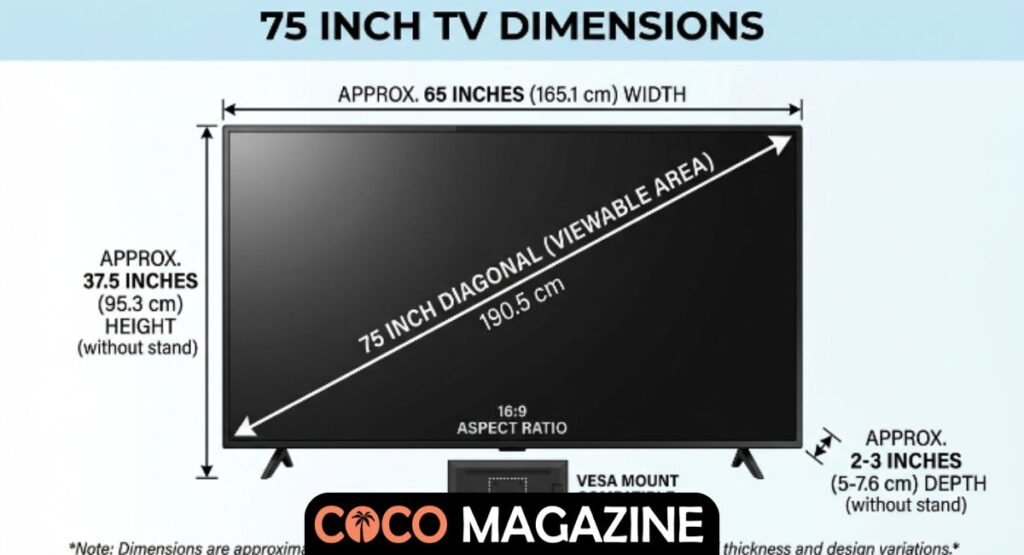
Finding the correct TV stand size is just as important as choosing the television itself. A stand that is too small can make the setup unstable, while an oversized cabinet may dominate the room. Most experts recommend selecting a stand that is slightly wider than the television. Since the average 75 inch TV width is about 66 to 68 inches, your TV console size should ideally measure between 70 and 76 inches. This provides better balance and creates a more attractive appearance. It also leaves room for speakers, gaming consoles, or decorative items without making everything feel cramped.
Not every television uses the same stand design. Some models include a center stand, while others have a wide-leg stand or pedestal stand that spreads the TV support base closer to the edges. Before buying furniture, check the exact TV stand compatibility and the spacing between the stand legs. Also confirm the stand’s weight capacity because premium televisions can weigh more than 100 pounds. A sturdy entertainment center size not only supports your TV safely but also improves the overall appearance of your room.
| TV Size | Minimum Stand Width | Recommended Stand Width |
| 75 Inches | 66–68 inches | 70–76 inches |
| Stand Type | Best For |
| Center stand | Smaller TV cabinets |
| Pedestal stand | Modern furniture layouts |
| Wide-leg stand | Large entertainment consoles |
Buying Tip: Always measure the distance between the TV legs before purchasing a stand. Two televisions with the same screen size can require very different furniture.
Ideal Viewing Distance for a 75 Inch TV
A bigger screen does not always mean a better experience. Sitting too close can make fast-moving scenes uncomfortable to watch, while sitting too far away reduces the sharpness that modern televisions provide. The ideal viewing distance for 75 inch TV models depends mainly on the resolution. If you watch mostly 4K content, you can comfortably sit closer because individual pixels are much harder to see. For older Full HD content, you’ll usually want a little more distance to maintain a clear picture. Understanding the correct 4K viewing distance and 1080p viewing distance helps you enjoy movies, sports, and games exactly as they were meant to be seen.
Comfort also depends on the TV’s height and position. The center of the screen should line up closely with your natural eye-level placement when you’re seated. This reduces neck strain during long viewing sessions. Your viewing angle should remain comfortable whether you’re watching alone or with family. If you’re planning a complete large screen TV guide setup, think about your sofa placement before installing the television. Good TV placement guide planning creates a more immersive experience without requiring expensive equipment or room renovations.
| Resolution | Recommended Distance |
| 4K Ultra HD | 6.5–10 feet |
| 1080p Full HD | 8–12 feet |
| Room Size | Recommended TV |
| 10 × 10 ft | May feel too large |
| 12 × 12 ft | Good fit |
| 14 × 16 ft or larger | Excellent fit |
Expert Tip: The best room size for 75 inch TV installations usually allows at least 7 to 10 feet of seating distance between the sofa and the screen. This balance delivers a cinematic experience while keeping the picture comfortable for everyday viewing.
Can You Wall Mount a 75 Inch TV?
Yes, you can safely mount a 75-inch television on the wall, and many homeowners prefer this option because it creates a clean, modern look while saving valuable floor space. Before you begin, check the wall mount dimensions and your TV’s VESA mount size in the manufacturer’s manual. Most 75-inch models use a VESA mounting pattern such as 400×200 VESA or 600×400 VESA, although this can vary by model. The wall mount must match both the VESA pattern and the TV’s weight. You should also confirm the TV weight before purchasing a mounting bracket, since larger televisions often weigh between 75 and 130 pounds without the stand.
A safe installation starts with locating the wall studs behind your drywall. Use a stud finder instead of guessing because the mount should attach securely to the framing whenever possible. After mounting the television, leave enough screen-to-wall distance for ventilation and easy cable access. Proper TV mounting not only protects your investment but also improves your room’s appearance. Following a reliable TV installation guide and practicing safe TV installation ensures your new television stays secure for years.
| Wall Mount Checklist | Recommendation |
| VESA Pattern | Match your TV specifications |
| Wall Type | Stud wall preferred |
| Weight Rating | Higher than TV weight |
| Mount Position | Eye-level when seated |
| Cable Access | Leave room behind TV |
Installation Tip: Mount the center of the screen close to your seated eye level instead of placing the TV near the ceiling. This provides the most comfortable viewing experience.
Do 75 Inch TV Dimensions Vary by Brand?
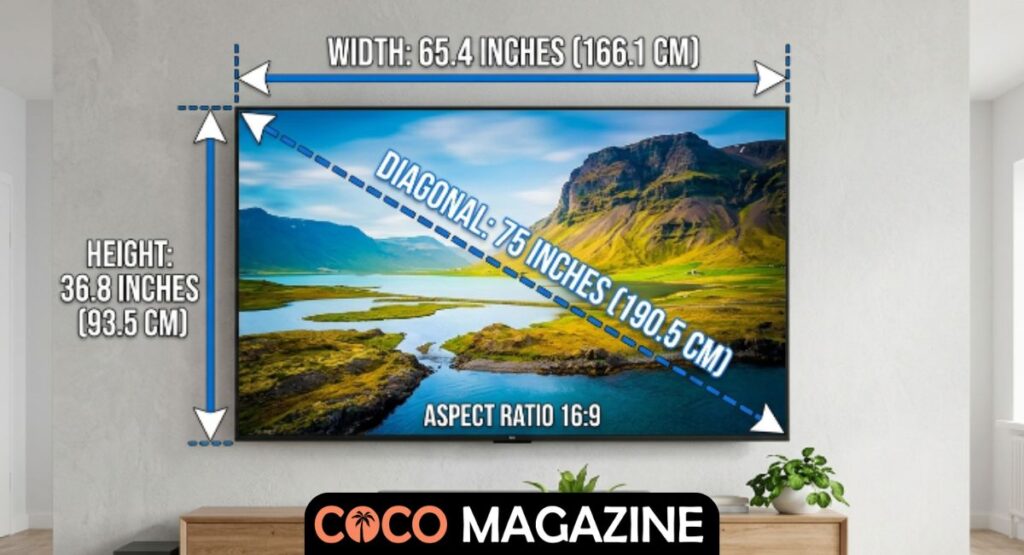
Although every modern 75-inch television uses the same screen size, the outside measurements can vary slightly from one manufacturer to another. The screen area remains almost identical because every model follows the 16:9 aspect ratio, but the TV width with bezel, TV thickness, and stand design are different. A premium Samsung 75-inch TV may have an ultra-thin frame, while a Hisense 75-inch TV or TCL 75-inch TV could use a slightly thicker border. These differences may seem small, yet they become important when you’re checking furniture dimensions or planning wall installation.
Design choices also affect the overall appearance of the television. An LG 75-inch TV with an OLED panel is often slimmer than many LED models, while a Sony 75-inch TV may include a unique stand that changes the required cabinet width. Every manufacturer publishes detailed TV specifications, so always compare the exact manufacturer dimensions before buying. Even a one-inch difference in width or stand placement can determine whether the TV fits your cabinet perfectly or creates an unexpected problem.
| Brand | Approximate Overall Width | Typical Design Feature |
| Samsung | 66–66.5 inches | Thin bezel design |
| LG | 66–67 inches | Slim OLED profile |
| Sony | 66–67 inches | Premium center stand |
| TCL | 66–68 inches | Wide-leg stand on many models |
| Hisense | 66–68 inches | Value-focused design |
Good to Know: Always compare TV size dimensions rather than assuming every 75-inch television has identical outside measurements.
Things to Consider Before Buying a 75 Inch TV
Buying a large television is about much more than choosing your favorite brand. Before making your purchase, compare the complete dimensions of a 75-inch TV, your available wall space, furniture size, and seating arrangement. Check your TV console width, verify your TV depth, and confirm that your cabinet supports the television’s weight capacity. If you plan to mount the TV, review the VESA pattern, wall type, and installation hardware before ordering. Spending a few extra minutes planning today can prevent expensive returns later.
Picture quality should also match the way you watch TV. Premium OLED TV models deliver outstanding contrast, while QLED TV and Mini-LED TV options offer impressive brightness for sunny rooms. Compare features instead of focusing only on screen size. Think about future upgrades, gaming consoles, streaming devices, and sound systems as part of your complete TV buying guide. Following a practical TV buying checklist will help you choose a television that fits your room, your budget, and your lifestyle.
| Before You Buy | Why It Matters |
| Measure your wall | Ensures the TV fits comfortably |
| Measure your furniture | Confirms proper support |
| Check TV weight | Prevents stand or mount issues |
| Verify VESA pattern | Ensures wall mount compatibility |
| Measure viewing distance | Improves picture quality |
| Compare TV models | Finds the best value |
Case Study: A homeowner purchased a 75-inch TV during a holiday sale without checking cabinet measurements. The television arrived safely, but the stand legs extended beyond the cabinet edges by several inches. Instead of enjoying movie night, they had to purchase a new entertainment console. Measuring first would have saved both time and money.
Conclusion
Choosing the right television becomes much easier once you understand 75 Inch TV Dimensions. The advertised screen size tells only part of the story. The complete 75 inch TV measurements, including width, height, depth, stand design, and viewing distance, determine whether the television fits your room comfortably. Taking accurate measurements before buying helps you avoid common installation mistakes and creates a setup that looks clean, balanced, and professional.
Whether you choose a wall-mounted display or place your television on a stand, careful planning always pays off. Compare TV dimensions chart information, confirm your furniture size, review the manufacturer’s specifications, and follow reliable TV setup tips before making your final decision. With the right preparation, your new 75-inch television will deliver an outstanding viewing experience for movies, sports, gaming, and everyday entertainment for many years to come.
FAQ’s About 75 Inch TV Dimensions
How big is a 75 inch TV compared to a person?
A 75-inch TV is about 65.4 inches (5.45 feet) wide and 36.8 inches (3.07 feet) tall, making it roughly as wide as an average adult is tall.
Is a 75 inch TV too big?
No, a 75-inch TV isn’t too big if you have enough room. It’s ideal for larger living rooms with a viewing distance of about 6.5 to 10 feet for 4K content.
How much space is required for a 75 inch TV?
You should have at least 72–80 inches of wall space and enough room to sit 6.5–10 feet away for the best viewing experience.
How much wider is a 75 inch TV than a 65 inch TV?
A 75-inch TV is approximately 8.7 inches wider than a 65-inch TV, giving you a noticeably larger viewing area.
Is it better to get a 65 or 75-inch TV?
Choose a 75-inch TV if your room is spacious and you sit farther away. A 65-inch TV is a better choice for smaller rooms or shorter viewing distances.
People Read Also: Noah Lee Ritter: Biography, Age, Family, Gender Transition, Career & Life Today

Welcome to Coco Magazine! I’m a digital marketer and content writer with over 9 years of experience, helping brands grow through strategic content and ethical outreach. Guest contributors and collaborators are always welcome here.